
How iOS App Cleared Apple App Review in just 1 hour: A Real Case Study (2026 guide)
Sunny Court is a small utility for tennis players: it shows how the sun will hit a given court at a given time, so you can pick the side that won't blind you on serves and overheads. Single problem, single decision the user makes — exactly the kind of app Apple's reviewers are happy to wave through.
When it hit the App Store this week, the timing stood out: the active review itself took 1 hour — from "In Review" to "Ready for Distribution" — on a first submission, with no re-submissions, clarification rounds, or Guideline 4.3 push-back.
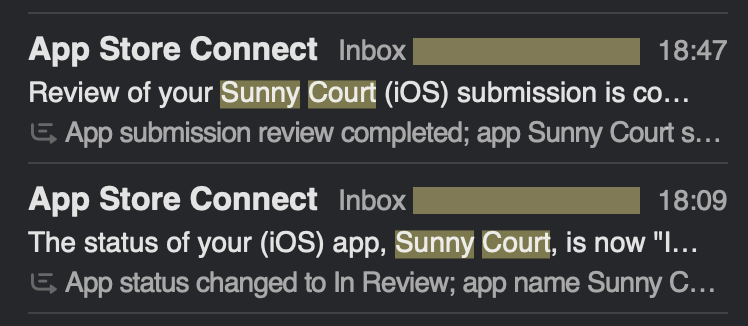
That kind of speed is uncommon. In 2026, a typical first submission still sits in queue for 24-48 hours at minimum, and often considerably longer — multi-day waits and clarification rounds are normal. A 1-hour active review is a real outlier — and outliers are repeatable when you treat the submission itself as a feature you ship. Here's exactly what worked.
The 5 things Sunny Court got right
1. A clean, single-purpose app
Apple's most common rejection in 2026 isn't crashes — it's Guideline 4.3 (Spam / Duplicate Apps). Reviewers have seen 40 weather and tennis apps this week; if yours doesn't immediately read as different, it falls into the slow lane.
Sunny Court's listing leads with one specific, novel idea in the first screenshot — "see exactly where the sun will shine on this court at 3pm so you don't have to play into the glare." That's not a tennis app, not a weather app, not a sports utility — it's a precise tool for one annoying real-world problem. The reviewer can describe it in one sentence within five seconds of opening the listing, which moves you out of the 4.3 risk zone immediately.
2. App Review Information that pre-answered the obvious questions
The Notes field inside App Review Information (the reviewer-only briefing in App Store Connect — not to be confused with the public listing description) is dead space in 95% of submissions. Sunny Court used it the way it's actually meant to be used — a short briefing for the reviewer:
- What the app is for in one sentence ("X for Y, helping users do Z")
- How the core flow works — the exact 3-4 taps to reach the main feature
- What's gated and what's not — anything behind a login or a paywall, with demo credentials inline
That short note removes guesswork. The reviewer doesn't have to discover the app's purpose by clicking around — they open the build already knowing what they're looking at, and the review collapses into "verify the described flows work" instead of "figure out what this is."
Attach a private demo video — this is must-have in 2026, not a bonus. Sunny Court recorded a short screen-capture walkthrough of the app and attached it to App Review Information. With Apple's review pipeline tightened to hours rather than days, reviewers don't have time to discover your app's flow on their own — they want to see it run before they even install the build. A private demo video collapses the test phase: the reviewer scrubs the recording, confirms the described flows work, then opens the build to spot-check. Submissions without one routinely sit in the queue longer just because the reviewer is being extra cautious. It's not the public App Store listing video — it's a private review-only attachment that says "here's exactly what you'll see when you tap around."
3. Listing assets ready before submission — including a preview video
This is the part most indies skip and it actively hurts review speed. A reviewer landing on a listing with three placeholder screenshots, no caption, and no preview video implicitly reads as "early build, probably broken" — and reviewers are slower with apps they don't trust. Polished assets signal "I'm done, ship it."
Sunny Court's submission went in with:
- Full set of captioned screenshots for both iPhone 6.9" and iPad 13" — each one with a short, scannable caption explaining the screen
- App preview video demonstrating the core flow in 20 seconds, muted-friendly, with a strong final frame — produced with App Store Preview Studio, which handled the cutting, frame rate, and per-device resolutions automatically (raw screen recordings in, Connect-ready video out — no timeline editing)
The preview video specifically is what tips many borderline reviews. It proves the app works, in motion, end-to-end — the reviewer doesn't have to wonder if a flow is broken because they just watched it run. The fact that production took ~15 minutes instead of a half-day in Final Cut is the only reason the video made it into a fast-turnaround submission at all — without a low-friction tool, it would have been the obvious thing to skip "for the next update."
The checklist any indie can copy
- One sentence that describes your app — and your first screenshot makes that sentence visible
- Full set of captioned screenshots for iPhone 6.9" and iPad 13" (Apple auto-resizes the rest)
- App Store preview video uploaded for the listing — proves the app works in motion
- Private demo screen-recording attached to App Review Information so the reviewer can scrub through the core flow before testing
- Review notes that explain what the app is for and how the core flow works
- Build tested on the latest iOS at the largest iPhone size before upload
- No placeholder text anywhere in metadata (no "Coming soon", no "TBD", no template URLs)
- Functional support URL — not a 404, not a parked domain
- Crash-free TestFlight for at least 48h before submitting
What does NOT speed up review
- Marking your release as "high priority" — the field exists but Apple barely looks at it for non-emergency cases
- Filing an expedited review request — only granted for security fixes / app-breaking bugs / time-critical events
- Asking the reviewer to be quick in the notes — counterproductive
Quick summary
Fast App Review approvals aren't a trick. The pattern Sunny Court followed is: make the app scannable in 5 seconds, the submission scannable in 30 seconds, and don't give the reviewer a single reason to pause. Everything else is queue luck.
If you want the reviewer to land on your build, run through it once, and click Approve without thinking — write the metadata for that exact reviewer, not for the App Store listing.
Useful tools
- AppStoreReview — once you're live, monitor reviews across 175+ countries with instant alerts via Email, Slack, or Telegram
- App Store Screenshots That Convert — the first 2-3 screenshots decide installs
- How to Appeal App Store Rejection — for the times when "fast" doesn't happen
Frequently Asked Questions
How long does App Review usually take in 2026?
A typical first submission takes 24-48 hours minimum, and longer waits (3-5+ days) remain common, especially around holidays or when the metadata is ambiguous. Sub-day approvals do happen but are the exception, not the norm — they almost always require a clean, single-purpose app and a thoroughly prepared submission.
What's the single biggest reason first submissions get delayed?
Ambiguity. The reviewer can't tell what the app does in 5 seconds, can't reach the core flow without guessing, or finds something in the metadata that doesn't match the build. Pre-empt all three with clear App Review Information notes and a private demo video.